
FINAL PROJECT
Required Tool
Dreamweaver CS 5 or later version.
Steps:
To effectively edit the website for practice, kindly follow the instructions provided below.
Extract the zip to a specific folder.
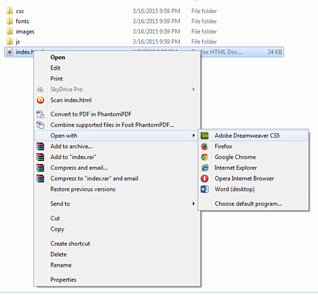
In the website folder, right click on “ Index ” html file
Go to “Open With” Option.
Click on Adobe Dreamweaver ( see figure).

Dreamweaver will load the index file.
Within Dreamweaver’s interface click on the Code as shown in
the figure.


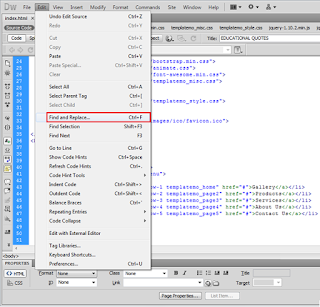
Press Ctrl + F or go to “Edit” menu and click on Find and
“Replace” command.

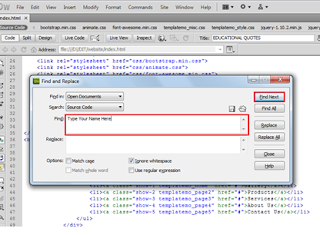
In the Find dialog box, type what to want to search in the
code in the find. For example if you want to have your real name in the place
of “Type Name Here” then type “Type Name Here” in find box and click on
the “Find Next” button.

After clicking on the “Find Next” button the Dreamweaver
will locate the text in the code. Close the Find and Replace dialog box.
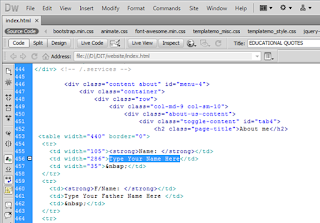

Using your keyboard type your real name, make sure to not edit Html tag such or any other tag around the text.

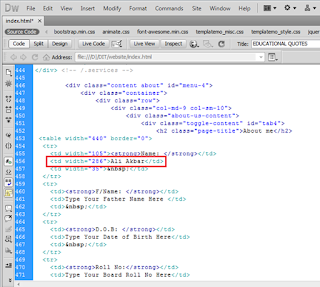
Follow step 7 – step 10 from other text as well.
Now save the file using Ctrl+S shortcut key or Save command
from File menu.
You can also download this tutorial as PDF.